
“When Did I Last Do That?” Choosing a Tracker App
Changing a toothbrush, cleaning a filter, watering a plant. Four things to look for when you choose an app to keep the last date of the things you only do now and then.
“When Did I Last Do That?” Choosing a Tracker App
When you last changed your toothbrush, when you last watered the plant, when you last washed the bedding. None of it is a big deal, but when you try to remember, nothing comes. “Was it last month, or the month before?” If you are looking for an app to answer questions like that, you only need to check a few things.
The kind of things you end up logging
- Replacing a toothbrush, contact lenses, razor blades
- Cleaning the water filter, air purifier or air conditioner filter
- Watering plants, repotting
- Washing the duvet and pillowcases
- Bathing the dog, trimming the cat's claws
- The day you got a haircut
- The day you called your parents
They have something in common. None of them happen every day, and none have a set date. That makes them awkward to put on a calendar, and they do not stick in your memory either.
Four things to check when choosing
1. Whether logging takes one step
With things you only do now and then, it is easy to forget to log them at all. If opening the app, finding the item and picking a date takes several steps, you give up after a few tries. One tap and done is best.
2. Whether you can see at a glance how long it has been
“2 weeks ago” is more useful for deciding than “March 14”. You do not have to look at a date and count the days to today.
3. Whether it keeps a history, not just the last time
Some apps simply overwrite the last date. With a history, you can see how often you actually do it. The toothbrush you meant to change every three months might really be getting changed every five.
4. Whether you need to sign up, and where the records are stored
Not many people want to create an account for records like these. Check whether you can use it without signing up and whether the records stay on your device.
Here is how it works with TapDiary
Make one button for each task. Something like “New toothbrush”, “Clean filter” or “Water monstera”. Tap the button once on the day you do it, and that time is kept. There is no sign-up, and the records are stored on your device.
The time since shows on the button. It reads like “3d ago”, “2w ago” or “1mo ago”, so just scanning the buttons shows you which ones have been a while.
A scan of the buttons shows which ones have been a while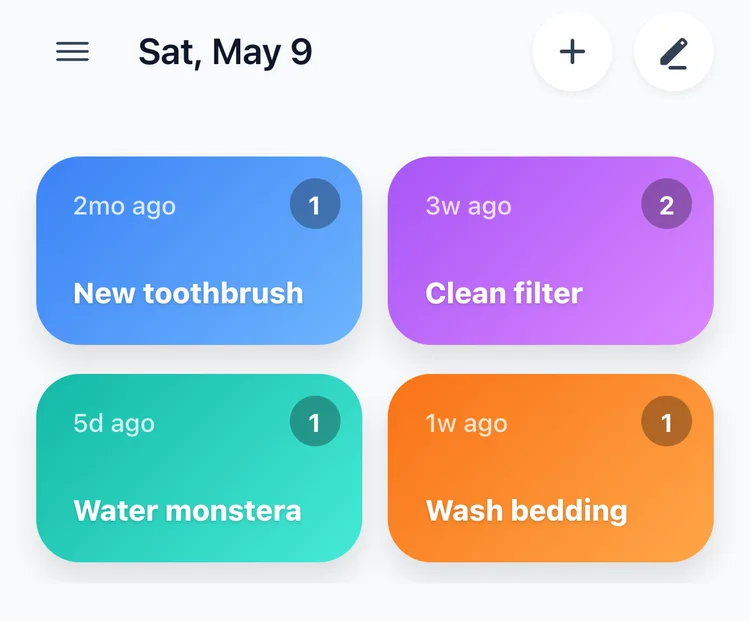
Set a reset cycle for each button. The reset cycle is the setting for when the button's count goes back to 0. The default is “Daily”, so if you leave it, what the button shows disappears the next day. For things you do now and then, change it to “Monthly” or “Yearly”. Then, within that month or that year, the time since stays up even as the date changes.
See the history in statistics. Pick a button on the All tab of the Statistics screen and you see the first and last record, like “68 days ago”, along with how many times you have done it so far. Filter the search screen to just that button and the dates you did it are listed one after another.
The every-three-months toothbrush is really changed every five or six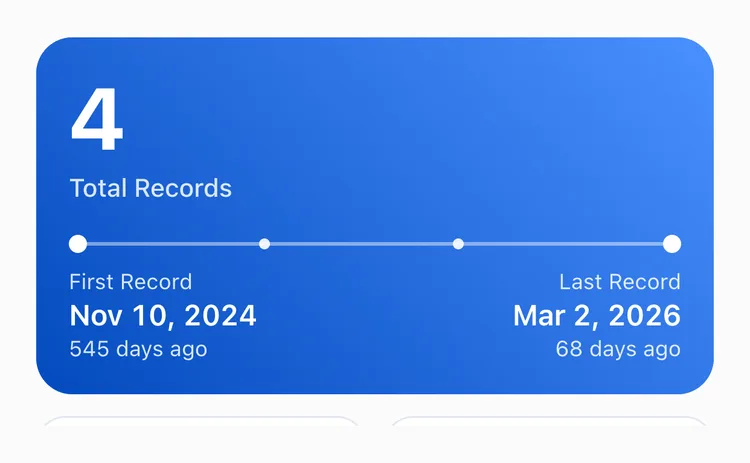
You can add a note too. If you changed a filter, write down “new filter model”; for a plant, “added fertilizer”. It helps the next time.
It is fine if you remember late. For something you did yesterday, tap today and then fix the date and time on the Timeline. When you first start using the app, put in the past dates you remember with Add Record, and you see “days ago” from the very first day.
And you can keep these buttons on the same screen as daily logs like taking medicine or drinking water. One app shows you both “how many times today” and “when was the last time”.
What TapDiary does not do
- It does not work out the next due date. There is no countdown like “12 days until the next change”.
- What the button shows only lasts within the reset cycle. The reset cycle follows the calendar, so even “Yearly” starts fresh on January 1. A filter you cleaned in December disappears from the button once January comes. When that happens, check Last Record on the All tab in statistics.
Leaving out due dates was on purpose. Entering a cycle for every task and correcting the due date every time you are a day late ends up with more to manage than to log. Before long, within a few months, you stop opening the app.
To answer “when was the last time”, the log has to run for months, even years. What lasts is usually the simple option. That is why TapDiary asks for nothing except one tap on the button on the day you do it.
Summary
| What you need | TapDiary |
|---|---|
| One-step logging | One tap on a button |
| How long it has been | Shown on the button, like “2w ago” |
| Past history | Search, All tab in statistics |
| Next due date | None |
| Sign-up | Not needed |
If you want an app where a scan of the buttons tells you “oh, it has been two months already”, with your daily logs in the same place, TapDiary is the one.
Related posts
Start recording with a single tap
No signup, just your personal records.