
How to Choose an App That Records from the Lock Screen
If you want to tap once on your iPhone lock screen and be done, there are only three things to check when you pick an app.
How to Choose an App That Records from the Lock Screen
Right after you take your medication, right after you drink your coffee. You mean to log it, but by the time you have found the app and opened it you are already doing something else. If you want to tap once on your iPhone lock screen and be done, there are only three things to look at.
1. Whether one tap finishes it
If tapping the widget opens the app, then you pick an item, then you save, it is no different from opening the app yourself. Check whether the record is kept the moment you tap and that is the end of it.
2. Whether you choose which buttons go up there
If what you want to log is your medication, the medication button has to be right there. An app that only shows you a screen it decided on leaves you unable to tap the one thing you actually need.
3. Whether the widget shows where you are right now
If “how many times today” is sitting on the widget, you never open the app just to check. That matters most when you cannot remember whether you took your morning medication.
Here is how it works with TapDiary
Make one button for each thing you want to record, then put the ones you use often on the lock screen as widgets. Wake the screen, tap once, and that time is kept without the app opening. The widget shows today's count alongside it. There is no sign-up, and the records are stored on your iPhone.
On the lock screen the buttons show up with today’s count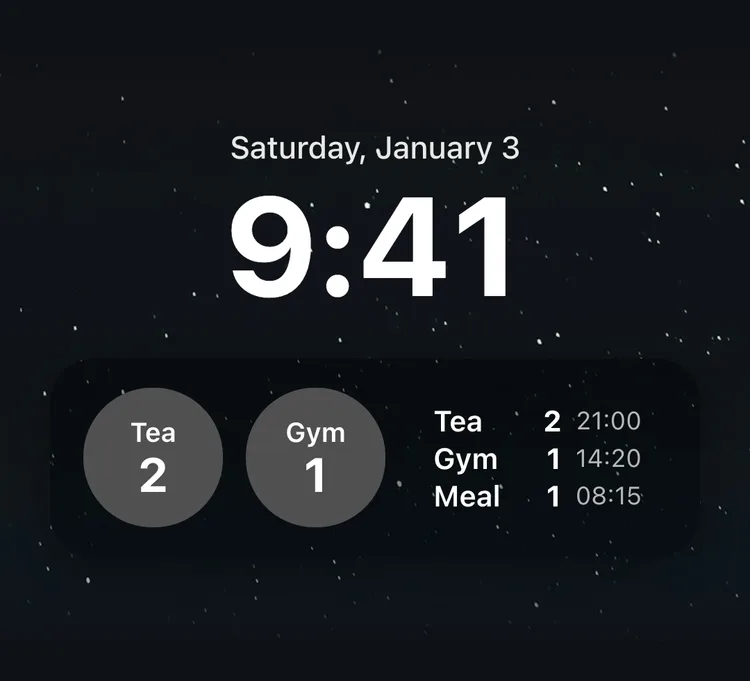
You can put several widgets on the lock screen. Place two or three of your most-used buttons side by side and simply waking the screen shows you where today stands.
For a button where you want to leave a line, you can set it to open the app for a memo when you tap it. That works well for records like symptoms, where the situation is the part that matters.
When the button is within reach at the moment you decide to tap it, the record keeps going. Putting a widget on the lock screen is written up step by step in setting up a lock screen widget.
Related posts
Start recording with a single tap
No signup, just your personal records.