
Count Your Glasses of Water with One Tap
“Did I drink any water today?” By the afternoon you cannot remember. Tap once for every glass and the button keeps count for you.
Count Your Glasses of Water with One Tap
You decide to drink eight glasses a day, and by four in the afternoon you have lost count. The glass you had in the morning you are sure of, but after that it blurs. You drink water so often and so casually that it never sticks in your memory.
Count glasses, not amounts
Plenty of apps have you enter how many ml you drank every time. The first few days are fine, but typing a number every time gets tedious, and in the end you stop.
Pick one cup or tumbler you always use and tap once per glass. With a 500 ml tumbler, a day with four taps is 2 liters. You only do the math once, at the start.
If you switch between a cup and a tumbler, split them into two buttons.
- “Glass of water”
- “Tumbler”
The number on the button tells you how many glasses today
Every tap raises today's count on the button. After midnight it starts again from 0. No need to work out which glass you are on; just look at the number.
The button also shows how long it has been since your last drink, like “2h ago”. When you have been buried in work, one look at it tells you it has been a while.
Each button shows today's glasses and how long since the last one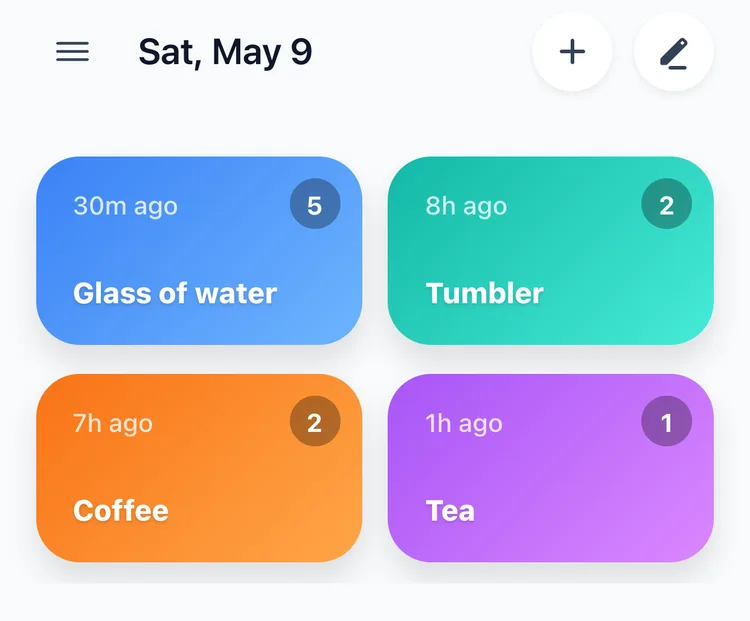
Tap right next to your cup
A water log usually breaks off because finding and opening the app is a hassle. If logging takes longer than a sip of water, it will not last.
Put a widget on your lock screen or home screen and you can tap as soon as the screen wakes. The widget shows how many times you have tapped today, too. If you wear an Apple Watch, you can tap on your wrist as well. One tap when you get up to refill the tumbler, and that is it.
Look back over the day and the gaps show
The Day tab on the Statistics screen shows what time you drank that day and tells you the gap as well, like “Average interval between records is 3h 28m”. Wherever the time between two glasses stretched unusually long, you see it right away.
More than seven hours with nothing after lunch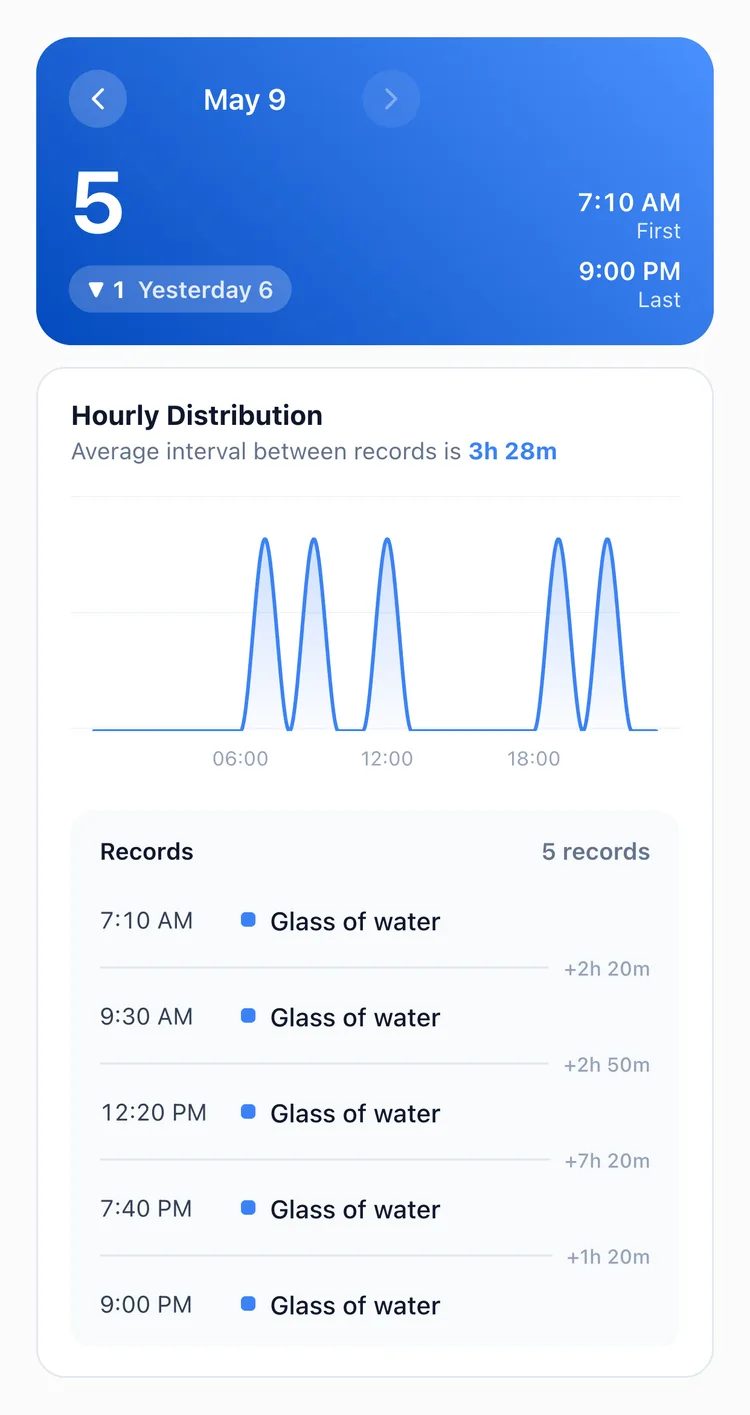
After a few days, the Hourly Pattern on the Week tab shows the hours when you do not drink. Many people drink well in the morning and then stop dead after lunch. Once you can see that stretch, fill your tumbler right then. By Day of Week also shows whether you drink less at the weekend.
Give coffee and tea their own buttons
Counting only water shows you half of “what did I drink today?”. Put Coffee and Tea buttons next to it and one screen shows you, side by side, whether you drank less water on the days you had a lot of coffee.
What TapDiary does not do
If you are choosing a water app, know this first.
- No reminders: it does not send notifications like “Time to drink some water”. If you really need reminders, an app that has them is the better fit.
- No goal bar: instead of a bar that fills up to eight glasses, it only shows how many glasses today.
- No ml totals: multiplying the number of glasses by your cup size is up to you.
All three are left out on purpose. After a few days you start dismissing reminders out of habit, and a goal bar you did not fill makes you not want to open the app. Entering the amount every time you drink quickly turns into a chore as well.
A water log is useful when it keeps going for months, not when it flares up for a few days. And what lasts is usually the simple option. That is why TapDiary is one tap per glass, and nothing more. In the same app you can count coffee, medicine or exercise too.
How much to drink differs from person to person
A log is a tool that shows how much you drank. How much you should drink in a day depends on your size, how active you are and the weather. If you have been told to limit fluids because of a kidney or heart condition, follow your doctor's advice.
Related posts
Start recording with a single tap
No signup, just your personal records.